

eInkPads
Focus Planner - Monthly
Focus Planner - Monthly
Impossible de charger la disponibilité du service de retrait
Focus Planner – Monthly (Digital PDF)
Plan with purpose. Reflect with intention.
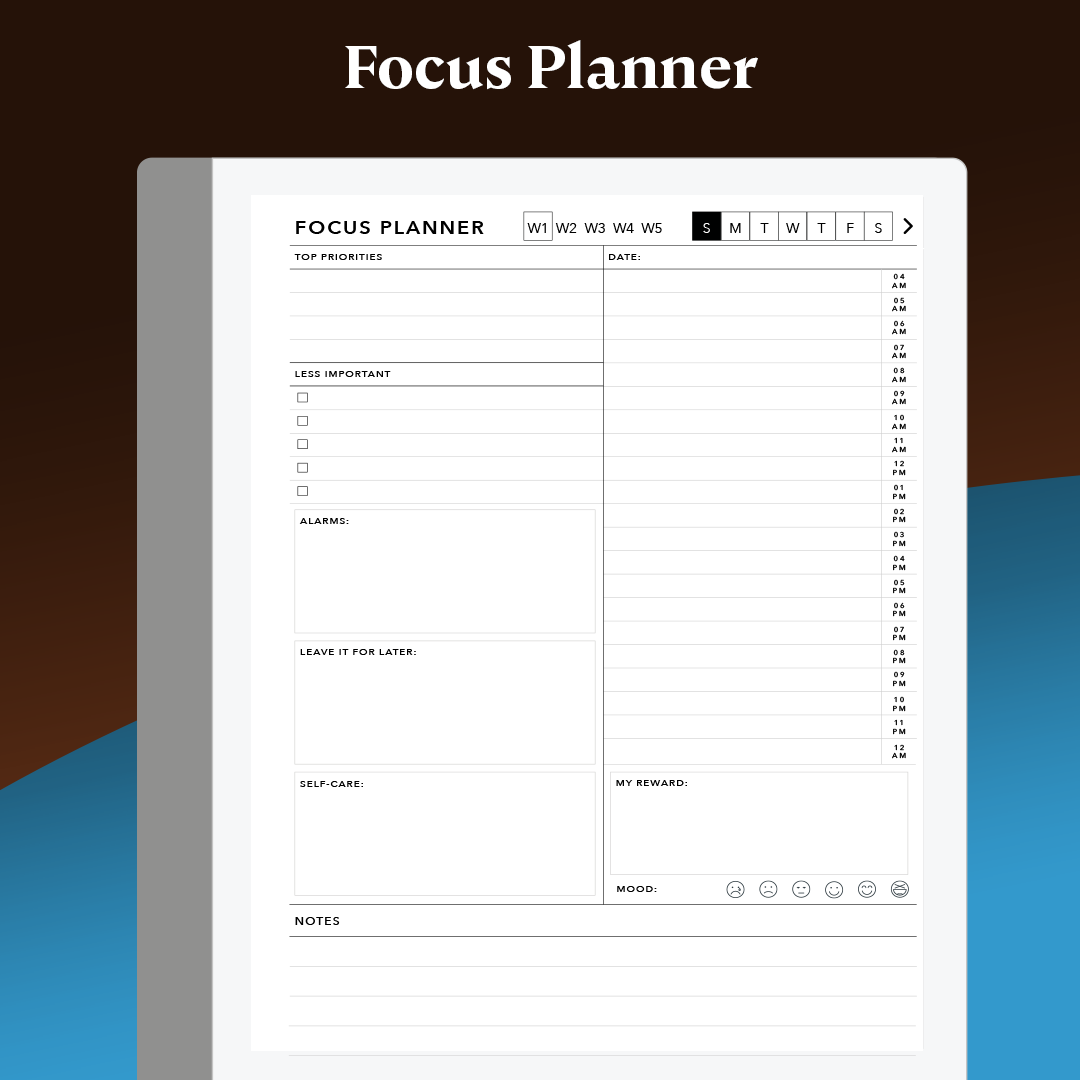
Stay organized, focused, and balanced with this minimalist, lightweight monthly planner designed for digital devices like reMarkable, iPad, and more.
✅ Daily Hourly Timeblocks — Plan your day from morning to night
✅ Top Priorities Section — Focus on what matters most
✅ Mood Tracker — Reflect daily and improve self-awareness
✅ Monthly Overview — Stay on top of the big picture
✅ Notes Space — Jot down tasks, thoughts, or ideas
✅ Reward Yourself — Celebrate wins & avoid burnout
✅ Covers up to 5 weeks per month — So you never miss a day
Stop downloading bulky planners that lag and drain your tablet.
Our modular approach is faster and smarter:
👉 Simply duplicate this lightweight PDF for each month of the year.
You’ll save space, reduce loading times, and enjoy a smoother planning experience.
Template Satisfaction Guarantee - Click for Details
Template Satisfaction Guarantee - Click for Details
If you’re unsatisfied with a purchased template, we’ll offer a free template of equal or lesser value. Limited to one per order.
Helpful Tips
How do I put this on my tablet?
How do I put this on my tablet?
You can import PDFs using the app available at remarkable.com. For PNGs, use either the Template Installer App or our Desktop Manager App (Binder) for installation.
What is the difference between a PDF and a PNG Template?
What is the difference between a PDF and a PNG Template?
A PDF functions like a multi-page notebook, typically featuring fixed navigation. This means you cannot add custom templates to additional pages after creation. In contrast, PNGs serve as templates for alternating page backgrounds throughout your notebook, offering more flexibility to build it according to your needs. PDFs can be imported using the app available at remarkable.com, while PNGs need to be installed using either the Template Installer App or our Desktop Manager App (Binder).
How do I Personalize Screens on my tablet?
How do I Personalize Screens on my tablet?
Personalizing your tablet screens can be a creative way to add personal information for protection in case your tablet is lost or stolen. Include your contact details so someone can reach you to return it. You can also add your logo or a photo of your favorite pet. The possibilities are endless, so feel free to get as creative as you like.
To Install screens you will need our Screen Personalizer App (Splash).
Everything Guaranteed to work on all versions of the Remarkable Tablet
Share