
Your calendars and tasks, on your reMarkable.
Now your pen writes back.
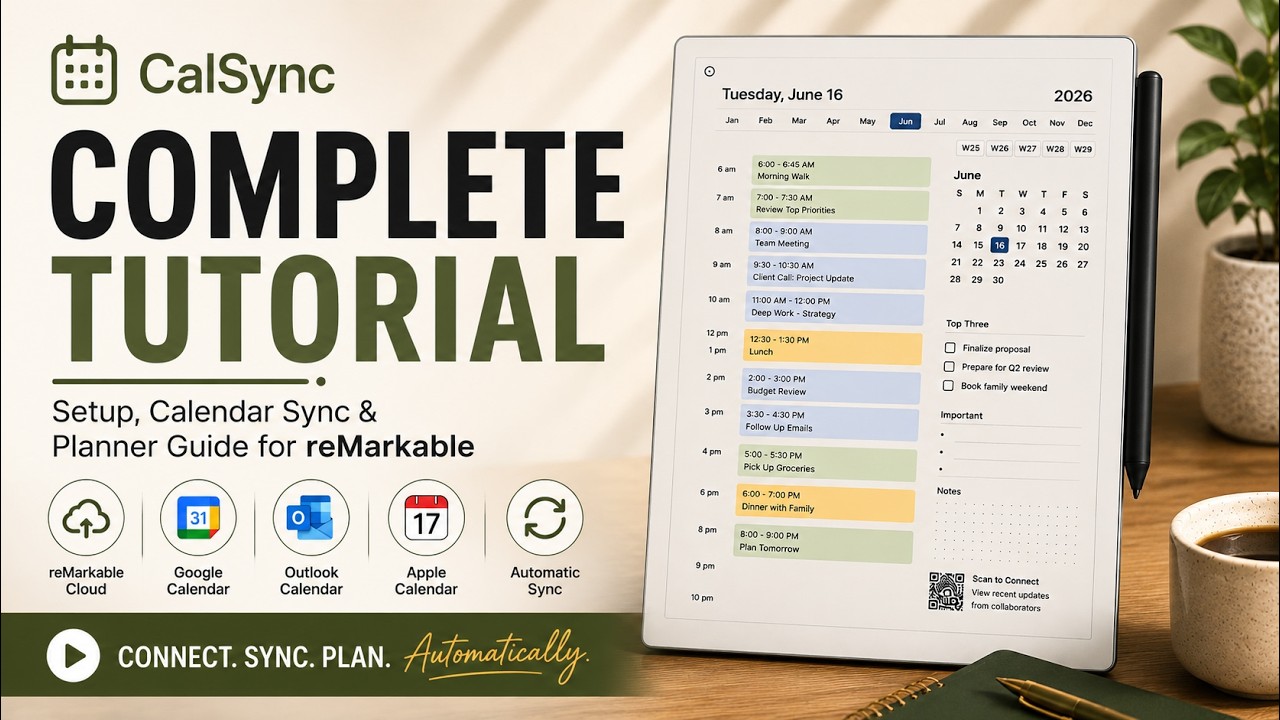
CalSync brings your Google, Outlook, Apple iCloud calendars and task lists directly onto your planner — then keeps everything current while preserving every handwritten note. Check off a task with your pen and CalSync can send that action back to your connected task service.
Get CalSync · $49 lifetimeOne purchase. No subscriptions. Includes free updates and support.

How CalSync works
No technical background needed — three steps from your calendar to your tablet.
Connect your calendars and tasks
Link Google, Apple, Outlook and supported task services. Pick exactly what you want inside your planner.
Generate your planner
CalSync builds your planner with your real events and tasks placed on the right days.
Write, sync and keep going
Send it to your reMarkable, write naturally, and re-sync anytime. Your handwritten notes remain intact.
Native cloud sync — no Developer Mode, no cables
Connect your reMarkable straight through reMarkable Cloud — just sign in and sync. No Developer Mode to enable, no USB cable, no complicated setup.
- Connect through reMarkable Cloud in seconds
- No Developer Mode required for cloud sync
- No USB cable needed
- Sync from anywhere — your handwriting always preserved

All your devices, one place
Add a profile for every tablet you own and switch the active one with a tap. CalSync remembers the right connection for each device.
- reMarkable Cloud, Direct Wi-Fi / USB, or Universal Mode
- Switch between devices any time
- CalSync remembers each device's connection
- Choose exactly where planners save with direct folder selection

Create unlimited planners forever
Generate as many planners as you want — yearly, monthly, or fully custom — tailored to your workflow. Regenerate any time and your handwritten notes carry over untouched.
- Unlimited planner generation
- Yearly, monthly & custom date ranges
- Personalize every planner with custom color cover pages
- Handwriting preserved on every update
- Favorites stay favorites when you regenerate
- Jump straight to today from the planner cover

Sync real calendar events automatically
Stop rewriting your schedule every day. CalSync connects directly to Google, Apple iCloud, Outlook and CalDAV calendars and drops your real events onto the right day and time.
- Combine multiple calendars into one planner
- Direct Google, Outlook, iCloud and CalDAV connections
- Upload private ICS files directly from your computer
- Events pulled directly into planner pages
- Auto-refresh when your planner regenerates

Your planner just became a two-way conversation.
Calendars and tasks come to the page. Your pen can send task actions back. And with CalSync Pro, Planner Insights helps you see the bigger picture behind your schedule.

Your pen can now complete your tasks
Bring your task lists directly into your planner alongside your calendar. With Task Markup, the marks you make with your pen can update the task service they came from on your next sync.
- Connect Todoist, Microsoft To Do, Google Tasks and CalDAV task lists
- ✓ Check a task and CalSync completes it in the connected task service
- × Dismiss a task from your planner
- — Draw a dash to push the task's due date forward one day
- Due-dated tasks automatically land on the appropriate day
- Completed and overdue tasks retain their history in the planner
Task Markup currently uses the Clarity day style. Available task actions can vary slightly by connected task service.

Scan your planner. See the bigger picture.
The QR code inside your CalSync planner can open Planner Insights on your phone, giving you a different view of the calendars already connected to that planner.
- See your clear days and your fullest days
- Understand your Work / Life balance from the calendars included in the planner
- Use Room Ahead to discover upcoming evenings with space
- See which weekdays and times tend to remain least scheduled
- Explore patterns across your day, week and year
- Push an updated planner to your tablet directly from your phone
Planner Insights is included with CalSync Pro and Business.

Today’s schedule at a glance
Your daily events can be summarized on your reMarkable's standby screen, so your schedule stays visible while the tablet sleeps.
- Daily agenda on the standby screen
- Updates with every supported sync
- Clean, distraction-free layout

Plans in your language
CalSync adapts month names, weekdays, date formats and planner labels so your planner feels natural wherever you use it.
- English, French, Spanish, Italian, German, Chinese & Japanese
- Region-aware date formats
- Native-feeling planners anywhere

Built for reMarkable — works on any tablet
Optimized first and foremost for reMarkable. With Universal Mode, CalSync generates planners for any tablet that can open a PDF.
Ready to start?
One purchase for Vault. No subscription required for the core CalSync experience.
One payment. Yours for life.
No subscription required for CalSync Vault. Lifetime updates included.
CalSync — Vault Edition
- Unlimited planners
- Google, Apple, Outlook & CalDAV calendar connections
- Supported task connections and Task Markup
- Sleep-screen agenda
- Universal Mode
- Lifetime updates
Productivity Bundle
- Everything in CalSync Vault
- Ep Binder Cloud — All Access
- Templates + screen personalization
- Best value for power users
- Lifetime updates on both
Lifetime license • Free updates • Dedicated support
Questions, answered
Is this a subscription?
CalSync Vault is a one-time purchase with a lifetime license and free updates. Optional Pro and Business memberships add cloud services and Planner Insights.
Can CalSync sync tasks as well as calendars?
Yes. CalSync supports Todoist, Microsoft To Do, Google Tasks and CalDAV task services. With Task Markup on the Clarity day style, supported pen marks can be interpreted on the next sync.
What is Planner Insights?
Planner Insights is a CalSync Pro and Business feature. Scan the QR code printed in your planner to see schedule patterns such as clear days, fuller days, Work / Life balance and Room Ahead on your phone.
Do I need Developer Mode or technical skills?
For most people, no. With reMarkable Cloud delivery you can sign in and sync without Developer Mode or cables. Some advanced direct-device features require supported device access.
Which calendars and devices are supported?
Google, Apple iCloud, Outlook and CalDAV calendars are supported. CalSync supports reMarkable devices directly and can create PDF planners for Supernote, BOOX, Kindle Scribe, iPad and other PDF-capable tablets.
How do I know my planner actually synced?
The Activity screen records planner deliveries and failures so you can see what happened and why.
Will syncing erase my handwritten notes?
No. CalSync is designed to preserve your handwriting when your planner is regenerated and updated.
What if I run into trouble?
Our support team is here to help. If CalSync isn't working the way you expect, reach out and we'll work with you to get it sorted.
See CalSync in action
See how calendars, planners and handwritten notes come together on your e-ink tablet.
Your calendars and tasks,
finally together on paper.
Keep your planner current, keep your handwriting, and let your pen do more.
Get CalSync · $49 lifetimeOne purchase. No subscription required for Vault. Includes free updates and support.